
Fontographer settings
The lovely Mr Matt Gardiner has used this tutorial to create pixel fonts in Fontographer and has kindly supplied some screen grabs for configuring it.
First you'll want to set up your grid correctly in program preferences.
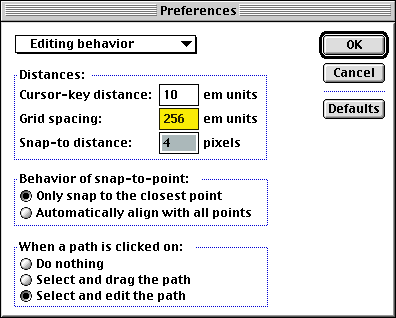
(You only need to edit the things shown in yellow).
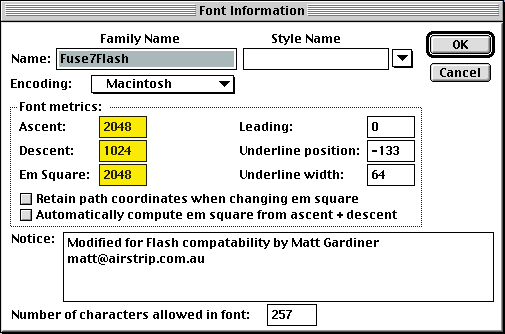
With that done, you can configure your font metrics.
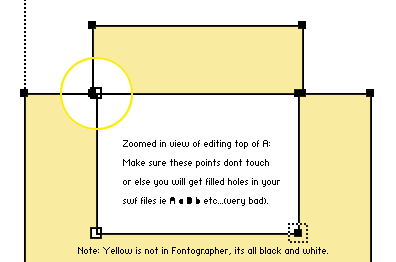
As with FCP, you need to make sure that the vectors don't intersect, or flash will show all your glyphs "filled".
And that's it!
Back to the start?
15 people have commented

Flipnote for the Nintendo DS? I don't think you can add your own fonts to it.

Do you know what limitations there are on the height of fonts?
I need to create a font for writing very tall bar-codes in windows. (Like 5500-6000 high in the metrics tab.) I couldn't find any existing. Is this possible to do?
I need to create a font for writing very tall bar-codes in windows. (Like 5500-6000 high in the metrics tab.) I couldn't find any existing. Is this possible to do?
Unless you want a font that's 6000 times high than it is wide, you shouldn't need to have such high metrics - just reduce everything down by some power of two.
Different renders stop working at different huge metrics, so you'd want to test on native windows apps, native mac apps and flash at the least.
Different renders stop working at different huge metrics, so you'd want to test on native windows apps, native mac apps and flash at the least.

I need to have a font created from an alphabet. It is a cursive calligraphic font. I can supply the letters (we can scan each letter and then email it for font construction)
We have 2 to be constructed from scan. They will have to be redrawn from the scan. Do we have them redrawn?
Please let me know
Thanks
Sandra / papergrafix toronto
We have 2 to be constructed from scan. They will have to be redrawn from the scan. Do we have them redrawn?
Please let me know
Thanks
Sandra / papergrafix toronto

still confused...........wish there was another way withou the stupid program! :(

Cal,
Great article. I found it really useful when I was converting an old Amiga bitmap font to TTF. There is, however, a small error in your tutorial. In the beggining you write:
"A bit of trial and error reveals that if you use point size 8 at 96 dpi it's the same as point size 6 at 72 dpi (96*6 = 72*8)."
While the formula is correct, the explanation is not. It should read as follows:
"A bit of trial and error reveals that if you use point size 6 at 96 dpi it's the same as point size 8 at 72 dpi (96*6 = 72*8)."
Small thing, but it may confuse people :)
Great article. I found it really useful when I was converting an old Amiga bitmap font to TTF. There is, however, a small error in your tutorial. In the beggining you write:
"A bit of trial and error reveals that if you use point size 8 at 96 dpi it's the same as point size 6 at 72 dpi (96*6 = 72*8)."
While the formula is correct, the explanation is not. It should read as follows:
"A bit of trial and error reveals that if you use point size 6 at 96 dpi it's the same as point size 8 at 72 dpi (96*6 = 72*8)."
Small thing, but it may confuse people :)
Thanks very much!
My resulting work: <a href="http://ptless.org/sfomi.html">ptless.org/sfomi.html</a>
My resulting work: <a href="http://ptless.org/sfomi.html">ptless.org/sfomi.html</a>

I've been looking for a post like this, thank you for sharing it!

Hi,
thanks for the article,how many pixels can fit into an A4 paper?
thanks for the article,how many pixels can fit into an A4 paper?
e no linux? como faz?
and the linux ? why?
portuguese.
Leave your own comment
Comments have been disabled
# October 25, 2009 - 3:42 pm PST